
Quick Summary
External graphics processing units (eGPUs) give compatible laptops access to desktop-class graphics performance without replacing the device itself. By connecting a graphics card through a high-speed interface such as a Thunderbolt, you can boost performance for gaming, video editing, 3D design, AI workloads and other graphics-intensive tasks.
For businesses and professionals, an eGPU can be a cost-effective way to extend the life of an existing laptop rather than investing in a new workstation. However, they aren’t the right fit for every user. In this guide, we’ll explain how eGPUs work, who they’re best suited for, and when a different solution may make more sense.
What Is an eGPU?
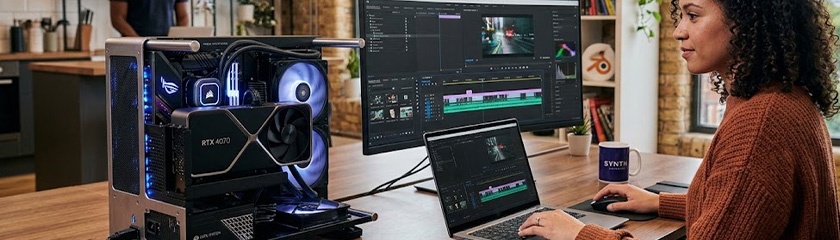
An eGPU is a desktop graphics card housed in a separate enclosure that connects to a laptop externally.
Allowing you to temporarily add desktop-level graphics power to a laptop when you need it.
A typical eGPU setup consists of:
- An eGPU enclosure
- A desktop graphics card
- Thunderbolt 3, 4, or 5 connection
- A laptop display
- Optional external monitor


Why Are eGPUs Becoming More Popular?
Modern business laptops are more powerful than ever, but many prioritise the ease of portability and slim designs over graphics performance.
This creates a challenge for users who occasionally need significantly more graphical processing power. A creative professional may spend most of their week using Microsoft 365 and other apps, then suddenly needs to render 3D assets or edit high-resolution video.
Similarly, data scientists and AI users may need GPU acceleration for specific projects but don’t require a dedicated workstation every day.
An eGPU helps bridge that gap.
Instead of replacing your laptop, you can connect an external graphics card whenever extra performance is needed and disconnect it when you’re on the move.
For procurement and IT teams, that can mean:
- Extending device lifespan
- Reducing upgrade cycles
- Supporting specialised users without buying separate desktops
- Retaining the flexibility of a mobile workforce
How Does an eGPU Work?
Connected by Thunderbolt or USB-C connection, the laptop sends graphics workloads to the external graphics card, which processes the data and renders the visuals. The external graphics card handles the demanding workload, freeing your laptop’s integrated graphics solution from tasks it wasn’t designed to manage.
What Hardware Options Are Available?
To get started, you’ll need three components. Below are some highly rated hardware options to consider when building an eGPU setup.
1. Compatible Laptop
Your laptop should support Thunderbolt 3, 4, 5, or compatible USB-C connectivity. Many premium business laptops support this such as the Lenovo ThinkPad X1 Carbon, Microsoft Surface Laptop 7, and HP EliteBook 8 G2i.

2. eGPU Enclosure
Popular options include the Razer Core X, Sonnet eGFX Breakaway Box, and ASUS ROG XG Station.
3. Desktop Graphics Card
This is the component that performs the actual graphics processing.
Popular options include:
Who Should Consider an eGPU?
Gaming
eGPUs can dramatically improve gaming performance compared with integrated graphics.
Benefits include:
- Higher frame rates
- Better visual quality
- Support for higher resolutions
- Improved ray tracing performance
Creative Work
Designers, editors and creators often benefit most. For freelancers and creative professionals an eGPU offers a flexible way to take additional graphics power with you from project to project, without investing in a dedicated workstation that spends most of its time sitting on a desk. If you’re looking for a device to pair with an eGPU, explore some of the best laptops for graphic design.
AI and Data Processing
An eGPU can provide the additional compute resources needed for tasks such as running AI models locally, experimenting with machine learning projects, processing large datasets and accelerating data visualisation. For businesses exploring AI without investing in a dedicated workstation, an eGPU can offer a practical middle ground.
Building an eGPU Workstation Through Leasing
However, technology requirements change quickly.
Your current laptop or a graphics card that’s sufficient today may feel underpowered in two or three years. That’s why many businesses choose leasing over outright purchase.

Benefits can include:
- One predictable monthly payment, making it easier to budget while working towards an eGPU setup
- Regular device refreshes, so you can upgrade when your performance requirements change
- 24/7 UK-based technical support, helping to minimise downtime and keep things running smoothly
- Access to the latest technology, helping you keep pace with evolving software, hardware and business requirements
Key Takeaways
- eGPUs allow compatible laptops to access desktop-class graphics performance.
- They’re ideal for creative professionals, gamers, AI users and power users
- An eGPU setup typically requires a laptop, graphics card and enclosure
- Thunderbolt connectivity is essential for most modern ePGU setups
- Leasing can help businesses spread costs and stay current with evolving technology
- In some cases, a dedicated workstation or high-performance laptop may still be the better choice
FAQs
Do I need a monitor for an eGPU?
Not always, but it’s highly recommended. Using an external monitor connected directly to the eGPU typically delivers the best performance.
If you’re using an external monitor, consider:
- 4K resolution for sharper visuals and additional screen space
- 27” Inch or larger display for multitasking and productivity
- USB-C connectivity for a cleaner, more convenient setup
- 120Hz+ refresh rate if gaming is a priority
- DisplayPort 1.4 or HDMI 2.1 to support higher resolutions and refresh rates
The Dell UltraSharp 27” 4K Display is a strong choice, offering a sharp 4K panel, USB-C connectivity and plenty of screen space for productivity and creative work.

How Much Does an eGPU Setup Cost?
The cost of an eGPU setup can vary significantly depending on the hardware you choose. As a rough guide:
- eGPU enclosure: £250-500+
- Desktop graphics card: £300-£1,500+
- Optional monitor: £250-£1,000+
What’s the Alternative to an eGPU Setup?
Building an eGPU setup isn’t the only option. Businesses and creative professionals can invest in a laptop with dedicated graphics or a workstation-class device. While these systems are typically more expensive, they offer powerful performance in a single package without the need for additional hardware.
Leading workstation options include the Lenovo ThinkPad P Series, HP ZBook Series and Dell Precision Series.
Not Sure Which Route Is Right for You?
The right graphics solution comes down to your workload, budget and growth plans. At HardSoft, we help UK businesses find the right hardware fit, with flexible leasing options that give you high-performance technology without the upfront cost.
Get in touch to discuss your requirements, or explore our range of laptops and leasing plans.


Steve Hill has been a cornerstone of HardSoft since 2005, bringing two decades of experience in leasing Apple devices and delivering tailored tech solutions to businesses across the UK. As HardSoft’s go-to expert in cybersecurity, Steve specialises in Sophos and Barracuda software, helping clients safeguard their operations with confidence. Steve’s passion for tech, teamwork, and trusted solutions makes him a valued voice on the HardSoft blog.
LinkedIn: Steve Hill
Email: steve@hardsoftcomputers.co.uk
Tel: 0204 566 8856